| public | ||
| server | ||
| src | ||
| .gitignore | ||
| building.txt | ||
| Dockerfile | ||
| LICENCE | ||
| nginx.conf | ||
| package-lock.json | ||
| package.json | ||
| radicale.ini | ||
| README.md | ||

📅 CalView - Progressive Web App Calendar
🌟 Overview
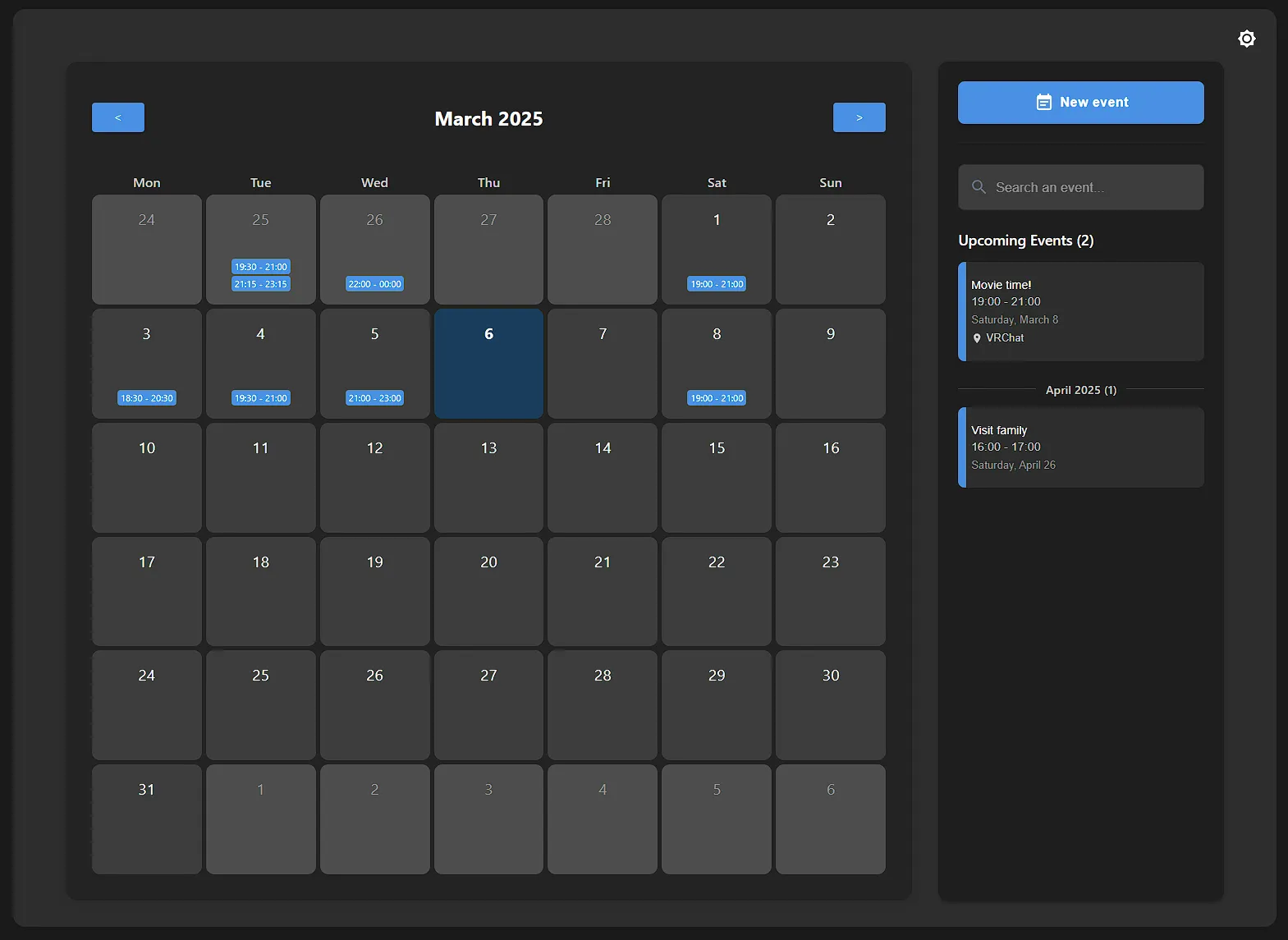
CalView is a modern, responsive calendar application built with React. It functions as a Progressive Web App (PWA) with offline capabilities, and includes both CalDAV integration and support for direct event creation. The app features a clean user interface with both light and dark themes, cross-device synchronization, and comprehensive event management.
⚠️ Disclaimer / No Support
This code is provided as-is, for informational and demonstration purposes. While effort has been made to ensure functionality, it comes with no warranty or guarantee of support.
Please note:
- This project is shared without dedicated support resources.
- Use of this code is at your own risk.
- No official support will be provided for setup, usage, customization, or troubleshooting.
- Community contributions and improvements via pull requests are welcome, but please do not expect personalized assistance.
For any issues or questions, consider consulting online resources, community forums, or attempting to resolve problems independently.
✨ Features
📆 Core Calendar Functionality
- Monthly Calendar View: Displays a clear monthly calendar with easy navigation
- Event Display: Shows events directly on the calendar days with color-coding and visual indicators
- Event Grouping: Intelligently handles multi-day events spanning multiple dates
- Event Details: Comprehensive modal view for reviewing event details
🚀 Progressive Web App Capabilities
- Offline Support: Full offline functionality using IndexedDB for local storage
- Installable: Can be installed on desktop and mobile devices as a standalone app
- Background Sync: Changes made while offline are synchronized when connection is restored
- Responsive Design: Dedicated mobile and desktop interfaces
📝 Event Management
- Manual Event Creation: Create and edit events directly within the app
- Cal.com Integration: Option to use Cal.com for scheduling and booking
- Event Photos: Add photos to events for better visual representation
- Location Support: Add location information to events with Google Maps integration
- CalDAV Support: Synchronize with standard CalDAV calendar servers
🎨 User Experience
- Dark/Light Theme: User-selectable themes that persist across sessions
- Search Functionality: Search for events by title or details
- Real-time Indicators: Shows which events are currently ongoing
- Network Status: Clear indication of online/offline status with sync notifications
- Pull-to-refresh: Mobile-friendly gestures for refreshing calendar data
🔧 Technologies Used
- React: For building the user interface
- Material UI (MUI): For providing a rich set of UI components and styling
- IndexedDB: For offline data storage and synchronization
- Service Workers: For PWA capabilities including offline support
- CalDAV: For calendar synchronization with standard calendar servers
- ical-expander: For parsing and handling iCalendar data
- Radicale: Backend CalDAV server integration
- Express: Backend API for handling events and photos
🐳 Production Instructions
To run CalView in a docker container, follow these steps:
-
Clone the repository:
git clone https://git.eidenz.moe/Eidenz/CalView.git cd CalView -
Build the Docker image:
docker build -t calview . -
Run the Docker container:
docker run -d -p 8080:80 calviewThis will start the container and expose the application on port 8080. You can access the application in your browser at
http://localhost:8080.⚠️ Is it highly recommended to mount a volume for the
datadirectory to persist event data and photos. This can be done by adding the following flag to thedocker runcommand:-v /path/to/data:/radicale/dataReplace
/path/to/datawith the path to the desired directory on your host machine.Make sure the directory is writable by the container.
💻 Development
To run CalView locally, follow these steps:
-
Clone the repository:
git clone https://git.eidenz.moe/Eidenz/CalView.git cd CalView -
Install dependencies:
npm install -
Start the application:
npm startThis will start the React development server, and you can view the application in your browser, typically at
http://localhost:3000.⚠️ FYI, I did not plan a way to test events in development outside the docker container. In this setup, you cannot fetch or create events.
📱 Usage
🧭 Basic Navigation
- Use the "<" and ">" buttons to navigate between months
- Click on any day to view events for that day
- Use the search field to find specific events
📋 Event Management
- Click "New event" to create a new calendar entry
- Choose between using the Cal.com booking system or creating an event manually
- For manual events, fill in details including title, description, location, and dates
- Optionally add a photo to your event (up to 40MB)
- View, edit or delete events by clicking on them in the calendar
📲 Mobile Features
- Install the app to your home screen for offline access
- Use pull-to-refresh to update your calendar data
- Tap events to view details, double-tap to edit directly
🔌 Offline Functionality
- Continue viewing your calendar when offline
- Create or edit events while offline
- Changes will automatically sync when back online
- Network status indicator shows connection state
🎭 Customization
- Toggle between light and dark mode using the theme button
- Your preferences are saved for future sessions
📲 PWA Installation
CalView can be installed as a Progressive Web App on various devices:
- Desktop Chrome/Edge: Click the install icon in the address bar
- Android: Tap "Add to Home Screen" when prompted or from the browser menu
- iOS: Tap the Share button, then "Add to Home Screen"
Installing as a PWA provides benefits like faster loading, offline access, and a more app-like experience.